
TABLE OF CONTENTS
Introduction
This article explains how to use the Ardens Faecal Immunochemical Test (FIT) resources to support the assessment, investigation, safety-netting, and follow-up of patients presenting with lower gastrointestinal (GI) symptoms for whom FIT testing may be appropriate. By the end of this article, you will understand how to access and use the available templates, reports, and dashboards to support the FIT pathway within clinical practice.
Background
Faecal Immunochemical Testing (FIT) supports the assessment of patients presenting with lower gastrointestinal symptoms where colorectal cancer may need to be considered.
FIT testing is recommended within national guidance to support referral decision-making, alongside clinical judgement, patient symptoms and appropriate safety netting.
How Ardens Can Help
Ardens provides a range of resources to support practices throughout the FIT pathway, including:
- Identifying patients who may be suitable for FIT testing
- Recording symptoms and clinical indications
- Requesting FIT
- Reviewing outstanding or returned results
- Supporting clinical decision-making and referral pathways
- Recording safety netting and follow-up activity
- Accessing patient and professional guidance resources
Resources available include:
- FIT consultation template
- NG12 Cancer Symptoms and Findings Analyser integration
- Clinical reports for identification and follow-up
- Cancer dashboards within Ardens Manager
How to Access our Resources
Template
- In a patient record, press F12
- In the top right search box type FIT and press enter or click Search
- From the search results, double-click on Faecal Immunochemical Test - FIT to open the template. You can also drag and drop the template to your list of favourites on the left.
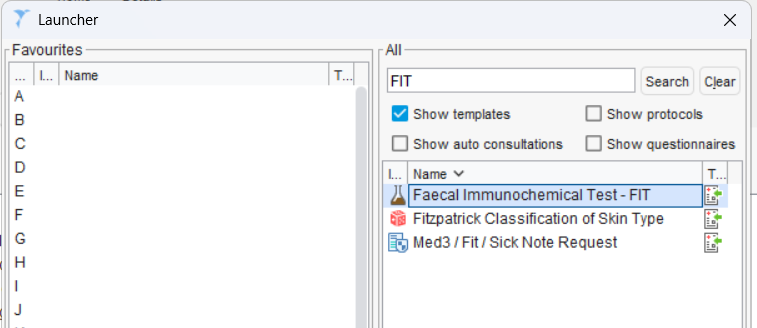
- The template can also be accessed from the NG12 Cancer Symptoms and Findings Analyser as well as the Stool Sample template
Reports
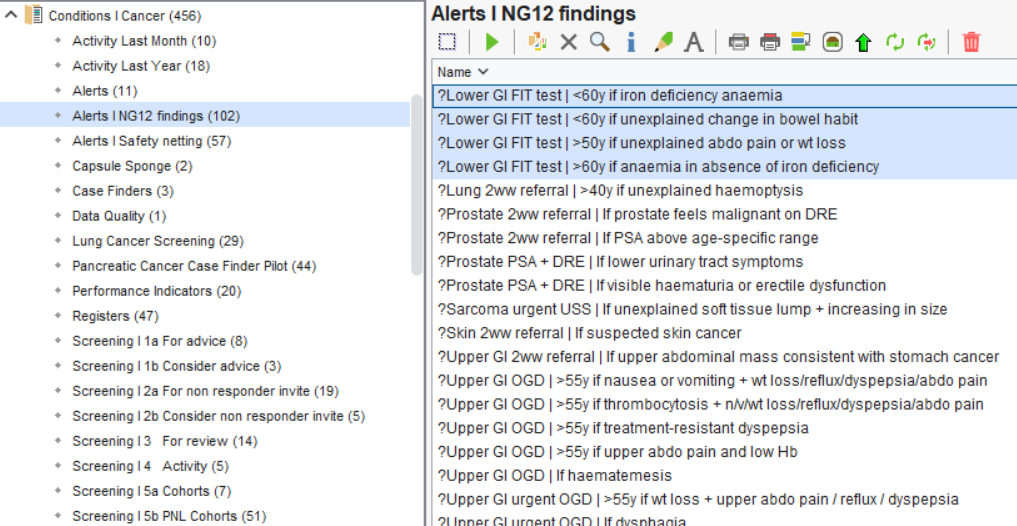
- Go to Reporting > Clinical Reporting
- Expand Arden's Ltd Folder
- Select Conditions I Cancer
Identify
The following reports can be used to help identify patients who may be appropriate for FIT testing in line with NG12 guidance:
- Lower GI FIT test | <60y if iron deficiency anaemia
- Lower GI FIT test | <60y if unexplained change in bowel habit
- Lower GI FIT test | >50y if unexplained abdominal pain or weight loss
- Lower GI FIT test | >60y if anaemia in absence of iron deficiency
These reports can support proactive identification and clinical review of patients who may require further investigation, FIT testing or referral consideration.
Test & Results
The Ardens "Faecal Immunochemical Test (FIT)" template supports clinicians throughout the FIT testing pathway, including:
- Recording symptoms and indications
- Requesting FIT
- Reviewing outstanding results
- Recording returned results
- Documenting safety netting and follow-up
- Accessing patient and professional guidance resources
The template contains the following sections:
- Test
- Result not back
- Result back
- Resources
Test
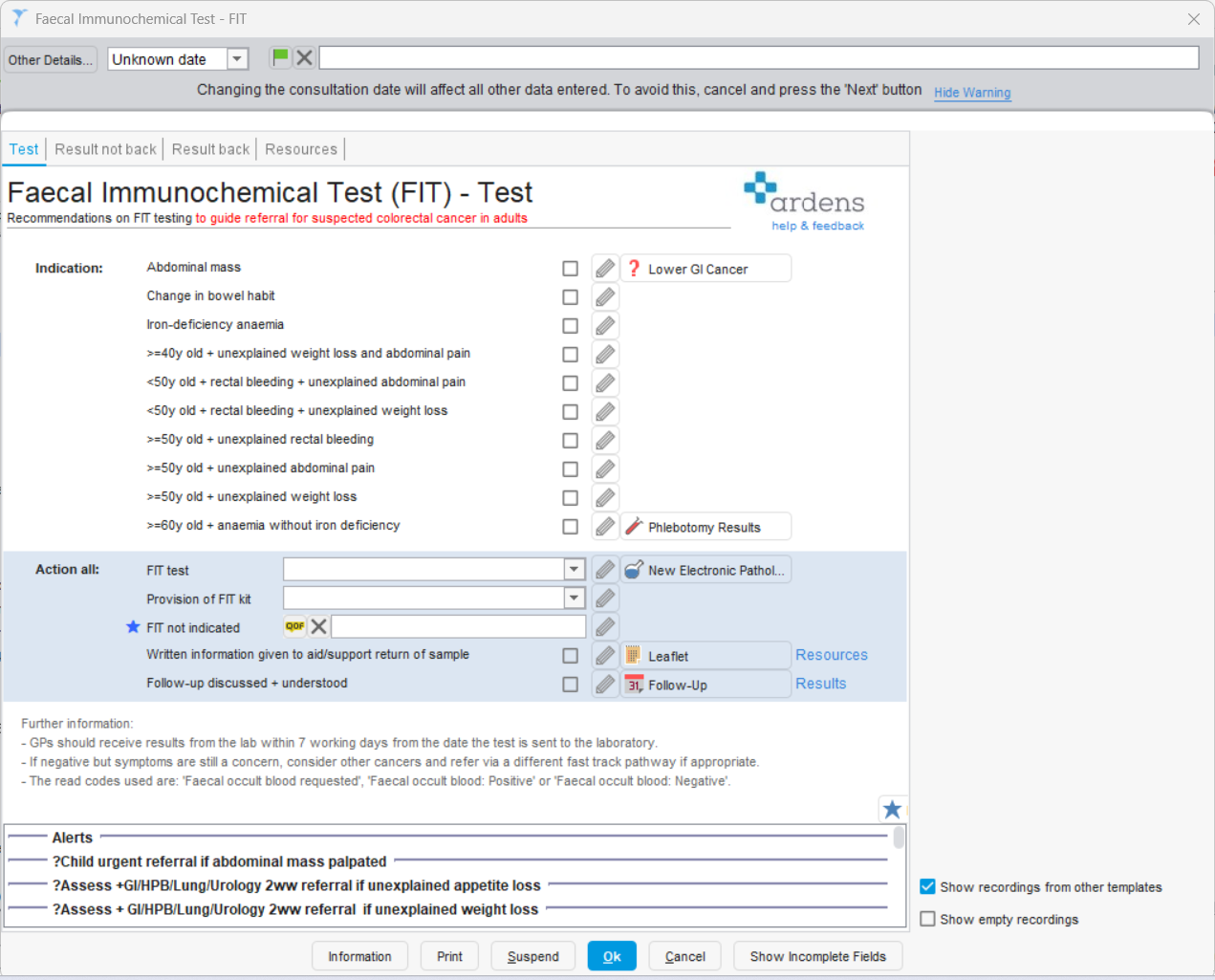
The Test tab is used when requesting a FIT test for a patient presenting with lower gastrointestinal symptoms where FIT testing may be appropriate.
This section supports clinicians in:
- Recording relevant symptoms and indications
- Documenting FIT kit provision
- Requesting FIT tests electronically
- Recording safety netting discussions
- Documenting where FIT testing is not indicated
Clinical prompts and alerts are displayed throughout the template to support clinical decision-making and to escalate when appropriate.
Within the Test tab:
- Tick the relevant indication(s)
- Record FIT kit provision
- Access the electronic pathology requesting system where applicable by clicking the button with the blue bottle
- Record any patient advice or follow-up discussions
Existing alerts and relevant information in the patient record are displayed in the lower section of the template.
Result not back
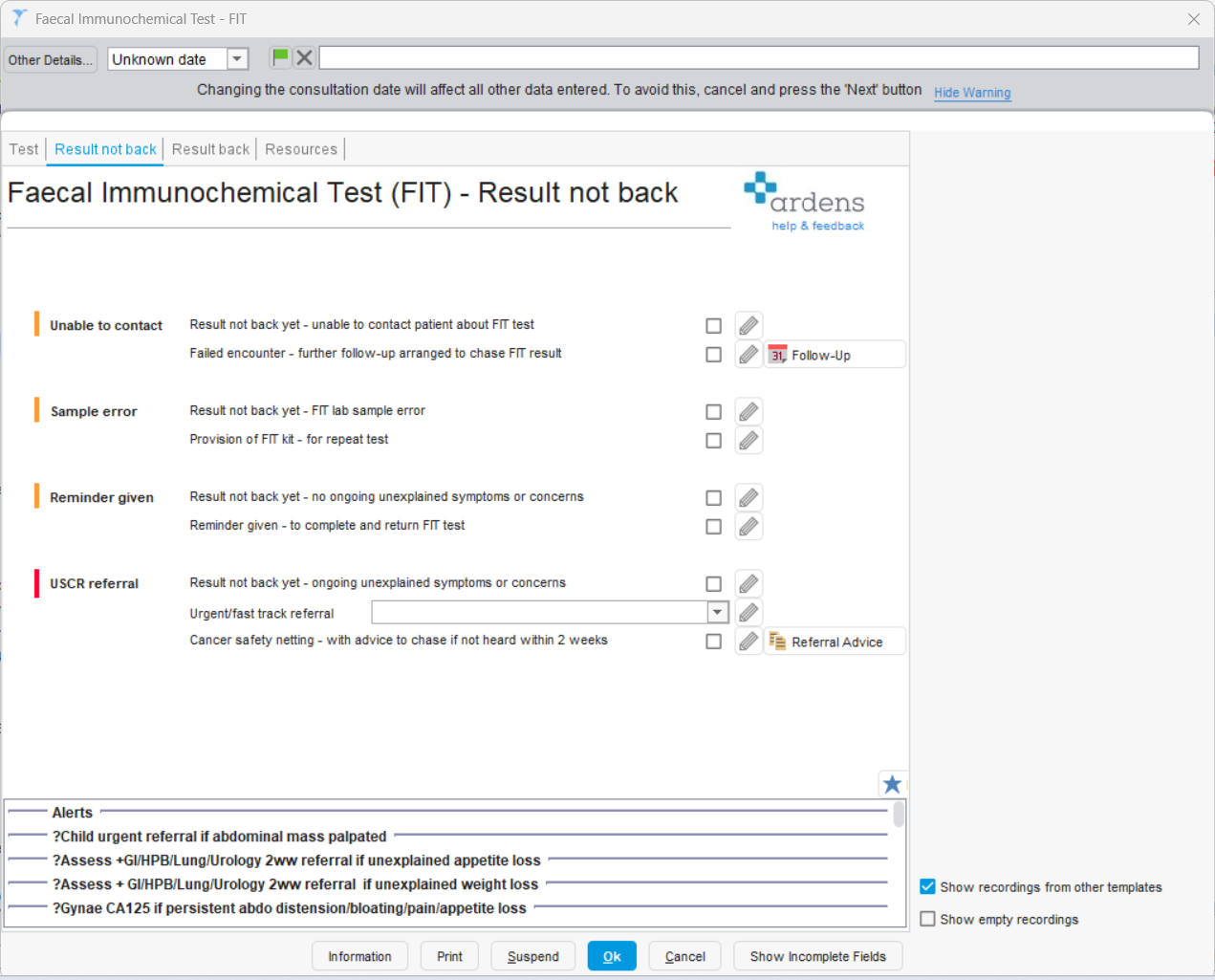
The Result not back tab supports practices in managing patients where a FIT result has not yet been returned.
This section supports:
- Reminder and follow-up activity
- Documenting failed contact attempts
- Recording repeat FIT kit provision
- Arranging additional review where symptoms persist
- Supporting safety netting processes
Use this section to document follow-up activity for patients with outstanding FIT results. Options include:
- Reminder given
- Unable to contact the patient
- Sample error/repeat kit required
- Urgent suspected cancer referral where ongoing concerns exist
Result back
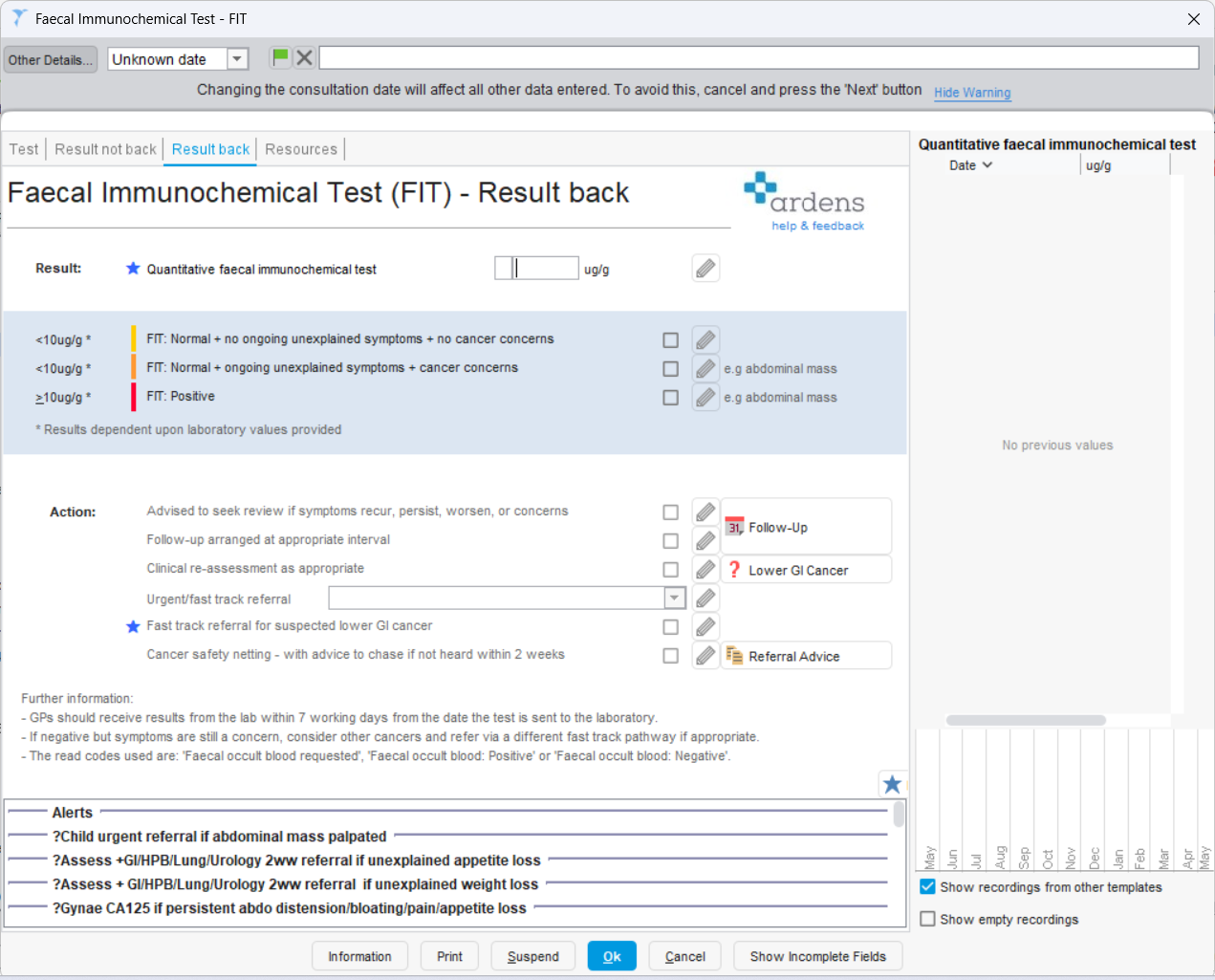
The Result back tab is used once a FIT result has been received from the laboratory.
This section supports clinicians in:
- Recording FIT results
- Reviewing results alongside symptoms and clinical concerns
- Documenting follow-up plans
- Recording referrals and safety netting
- Supporting ongoing clinical review
Once a FIT result has been filed from the pathology lab, it can be reviewed from within the template. Clicking in the result box will display previous FIT results to the right of the template.
The template provides guidance based on:
- FIT result value
- Ongoing symptoms
- Clinical concerns
The available actions and follow-up options are dependent on the outcome selected within the upper section of the template.
For example:
- A normal FIT result with no ongoing concerns will present different follow-up options to
- A positive FIT result or
- A patient with ongoing unexplained symptoms
This helps guide clinicians towards the most appropriate next steps, including:
- Follow-up
- Safety netting
- Further clinical review
- Urgent suspected cancer referral where appropriate
Resources
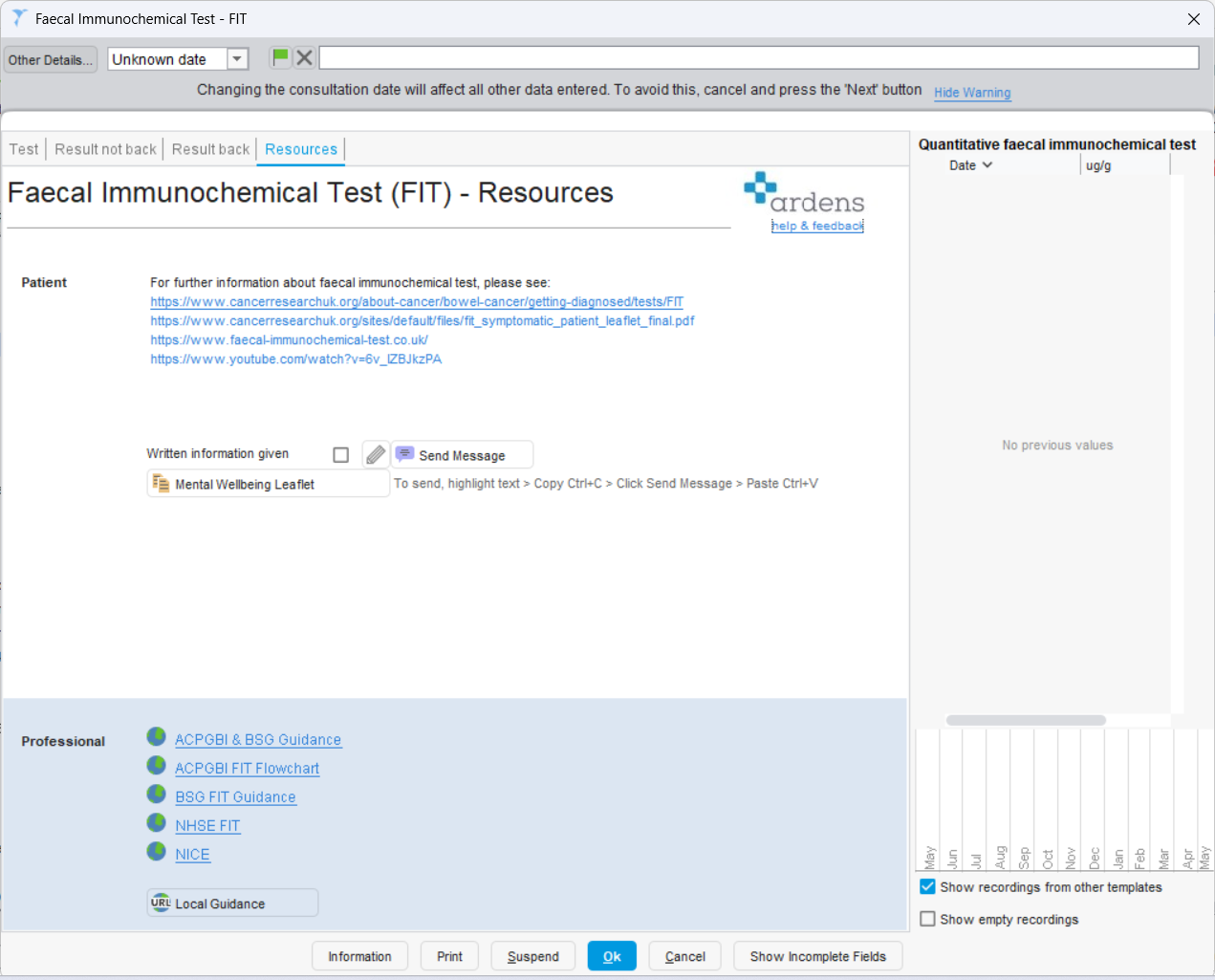
The Resources tab provides quick access to patient-facing and professional guidance relating to FIT testing and lower GI cancer pathways.
This section supports consistent patient information sharing and provides access to national guidance resources.
The Resources tab includes:
- Patient information leaflets
- FIT guidance websites
- Patient videos
- Professional guidance resources
- NICE and BSG guidance links
- Local guidance links where configured
Resources can be used during consultations or shared directly with patients where appropriate.
Monitor
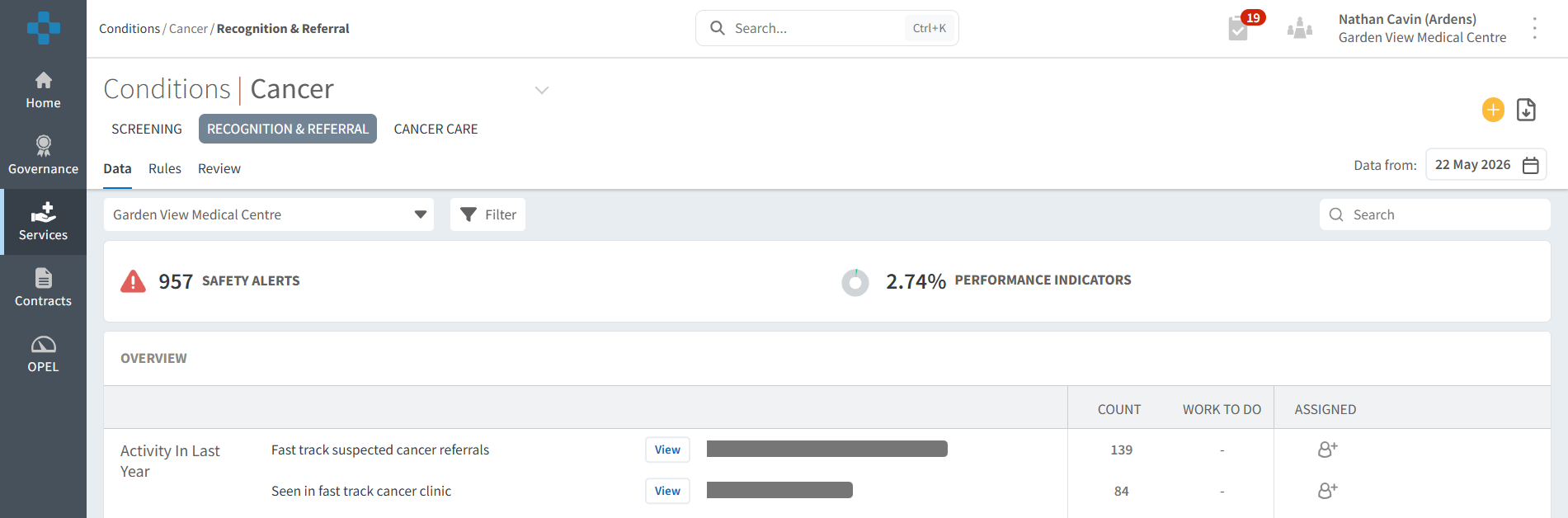
For Ardens Manager subscribers, the Cancer dashboard provides a clear visual overview of all cancer activity.
- Login to Ardens Manager
- Go to Services on the left-hand pane
- Click on Conditions
- Click on Cancer
FIT - Pilot
For organisations participating in the Fit Pilot led by University College Hospital (UCLH), reports are available to help identify outstanding work and track activity.
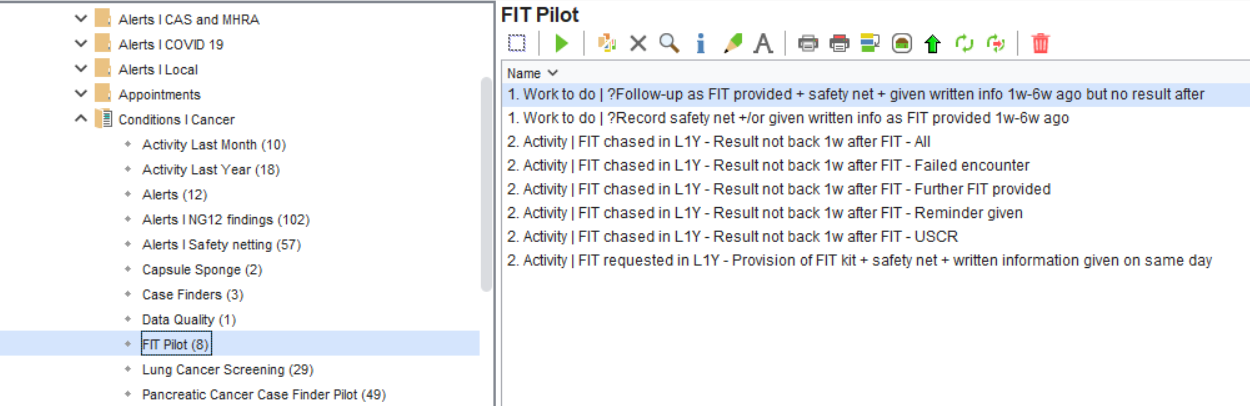
To record activity, clinicians are encouraged to use the Ardens "Faecal Immunochemical Test (FIT)" template.
Additional Support
To further your understanding of the Ardens resources and how to make the most of Ardens product:
- Book training for your GP Practice, PCN or ICB
- Contact our Support Team for support in real time