
TABLE OF CONTENTS
- Introduction
- Background
- How Ardens Can Help
- How to Access the Resources
- Investment Impact Fund (IIF)
- Cancer
- Learning Disability
- Continuity of Care
- ARRS
- Neighbourhood Health
- Overall Achievement
- FAQ
- Additional Learning
Introduction
This article explains how to use the Ardens Network Contract DES (NCD) resources to support activity recording, data quality, and achievement monitoring.
Background
The Network Contract Directed Enhanced Service (DES) supports Primary Care Networks (PCNs) in delivering key national priorities, including cancer diagnosis, learning disability health checks, continuity of care, and workforce utilisation.
For 2026/27, updates to the DES continue to focus on improving early cancer diagnosis, increasing uptake and quality of Learning Disability (LD) health checks, and ensuring accurate and timely coding to maximise achievement and patient outcomes.
How Ardens Can Help
Ardens provides a range of Network Contract DES resources to help GP practices:
- Ensure timely completion of indicators
- Improve data quality and coding accuracy
- Identify patients requiring intervention
- Monitor performance and achievement throughout the year
How to Access the Resources
Reports
- Go to Clinical Reporting.
- Expand the Ardens Ltd folder.
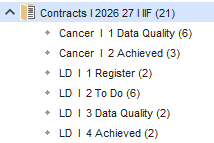
- Select Contracts I 2026 27 I IIF.
Templates
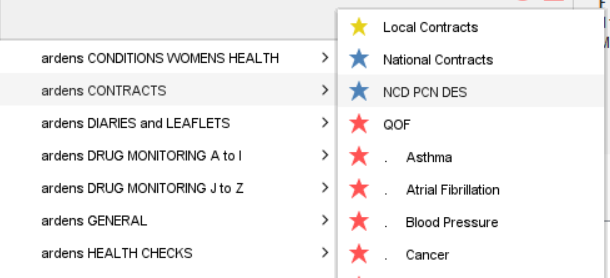
- Click Auto-Consultation.
- Select ardens CONTRACTS > NCD PCN DES.
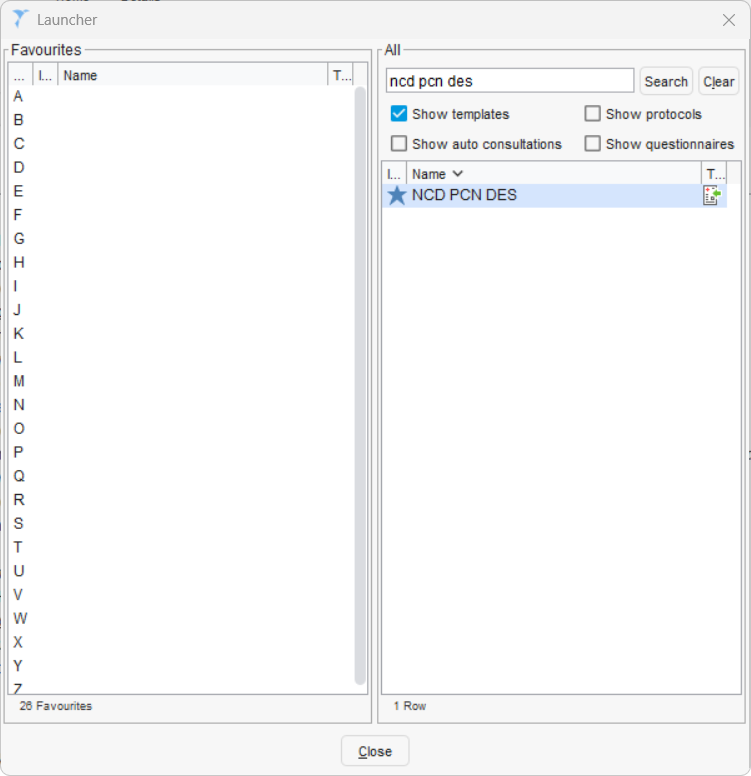
- Alternatively, press F12
- In the box that pops up, type NCD PCN DES
- Double click on the template to open it.
- You can also drag and drop a template to the left hand 'Favourites' section for easy access later on.
- You can do the same for some of the national templates, e.g. Learning Disabilities
Investment Impact Fund (IIF)
Cancer
The Cancer folder contains reports designed to support practices in improving early cancer detection and ensuring appropriate recording of activity related to suspected cancer referrals. These resources help identify patients who may require review, highlight coding issues, and monitor completed activity to support achievement.
Data Quality
The Data Quality folder contains reports to identify issues that may affect achievement.
Examples include:
- Incorrect FIT (qFIT) codes
- Missing FIT results
- FIT recorded after referral instead of before

⚠️Please note: A specific search highlights patients previously excluded due to a rectal haemorrhage code. Although referenced in the contract, this code is not part of the formal business rule exclusions, so records should be reviewed where appropriate.
Achieved
The Achieved reports can be used throughout the year to monitor IIF achievement.

Learning Disability
The Learning Disability (LD) folder contains reports to support practices in identifying patients on the LD register, managing annual health checks, and ensuring all required elements are recorded accurately. These resources help track outstanding work, highlight data quality issues, and monitor overall progress.
Register
The register report provides a summary of the number of patients on the LD register. This report is for informational purposes only and to support visibility of the current register size.

Outstanding
These reports identify patients with outstanding LD IIF requirements. Practices should encourage clinicians to use the Ardens Learning Disability template to record health check activity.

Data Quality
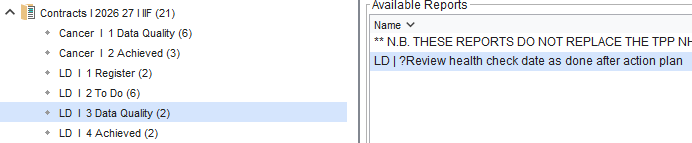
This report highlights LD patients who have had a health check recorded after the action plan, potentially affecting the achievement of the indicator. The action plan must be recorded on or after the same day as the health check to meet the IIF requirements.
Achieved
The Achieved reports can be used throughout the year to monitor IIF achievement.

Continuity of Care
The Continuity of Care element of the Network Contract DES focuses on supporting patients to receive more consistent, personalised care, particularly those with complex or ongoing needs. Ardens supports this through a Red, Amber, Green (RAG) patient segmentation approach, helping practices identify and prioritise patients who may benefit from proactive management and continuity-based care.
Resources include:
- Reports to identify and review patient RAG status
- A dedicated template to record and update RAG status
- Optional alerts to prompt review during consultations
- Dashboards to support population-level analytics and monitoring
For more detailed guidance, please refer to the Continuity of Care support article.
ARRS
The Additional Roles Reimbursement Scheme (ARRS) supports PCNs in expanding the multidisciplinary team to deliver patient care across a wider workforce. Ardens supports this by helping practices understand how ARRS roles are being utilised and ensuring activity is recorded consistently.
Resources include:
- Dashboards to break down activity by staff role and support workforce utilisation analysis
- A range of Ardens templates to guide structured consultations and ensure activity is captured accurately for reporting
Templates for the various ARRS roles can be found by navigating to Auto Consultation > ardens OTHER PROFESSIONALS, or alternatively using F12 to search and add them to you favourites.
Neighbourhood Health
The Neighbourhood Health element of the Network Contract DES focuses on delivering proactive, coordinated care at a local level, often through multidisciplinary working and collaboration across services. This includes identifying and supporting patients with higher needs, such as those who are frail or have complex conditions.
Contact accounts@ardens.org.uk for more information, including setting up hubs, community units, and INT data-sharing groups.
Overall Achievement
Ardens Manager is a cloud-based analytics tool that helps GP practices, PCNs and ICBs to analyse primary care needs and activities. The Network Contract Dashboard provides useful insights into NCD performance, including points and threshold achievements.
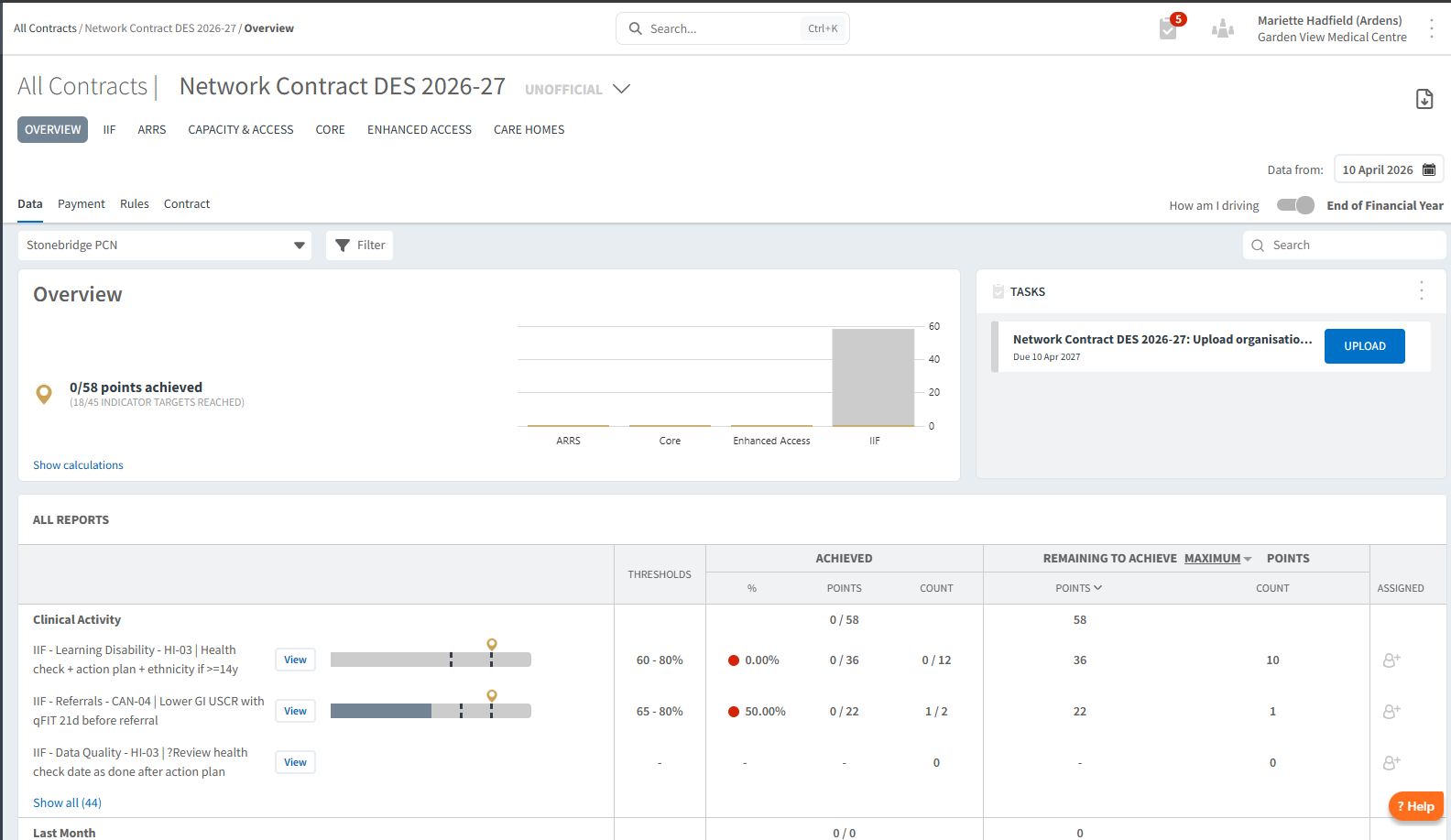
For existing Ardens Manager customers, explore our range of support articles to ensure you are getting the most out of the dashboard.
For those new to Ardens Manager, sign up for a free 1-month trial.
FAQ
What is the difference between Data Quality and Achieved reports?
Data Quality reports identify missing, incorrect, or inconsistent coding that may prevent achievement. Achieved reports show where all required activity has been completed and coded correctly.
How should practices use the Ardens templates for Network DES?
Clinicians should use the relevant Ardens templates (e.g. Cancer/FIT and Learning Disability) during consultations to ensure activity is recorded in a structured and consistent way.
How can practices monitor performance across Network DES areas?
Practices can use a combination of Ardens reports and dashboards to track activity, review outstanding work, identify data quality issues, and monitor overall achievement throughout the year.
Additional Learning
- Watch the GP Contract 2026/27 Update Webinar for a demonstration of the resources.
- Explore more helpful Support Articles.
- Book training for your GP Practice, PCN or ICB.
If you require any further assistance on the process above, please contact Ardens support on: